

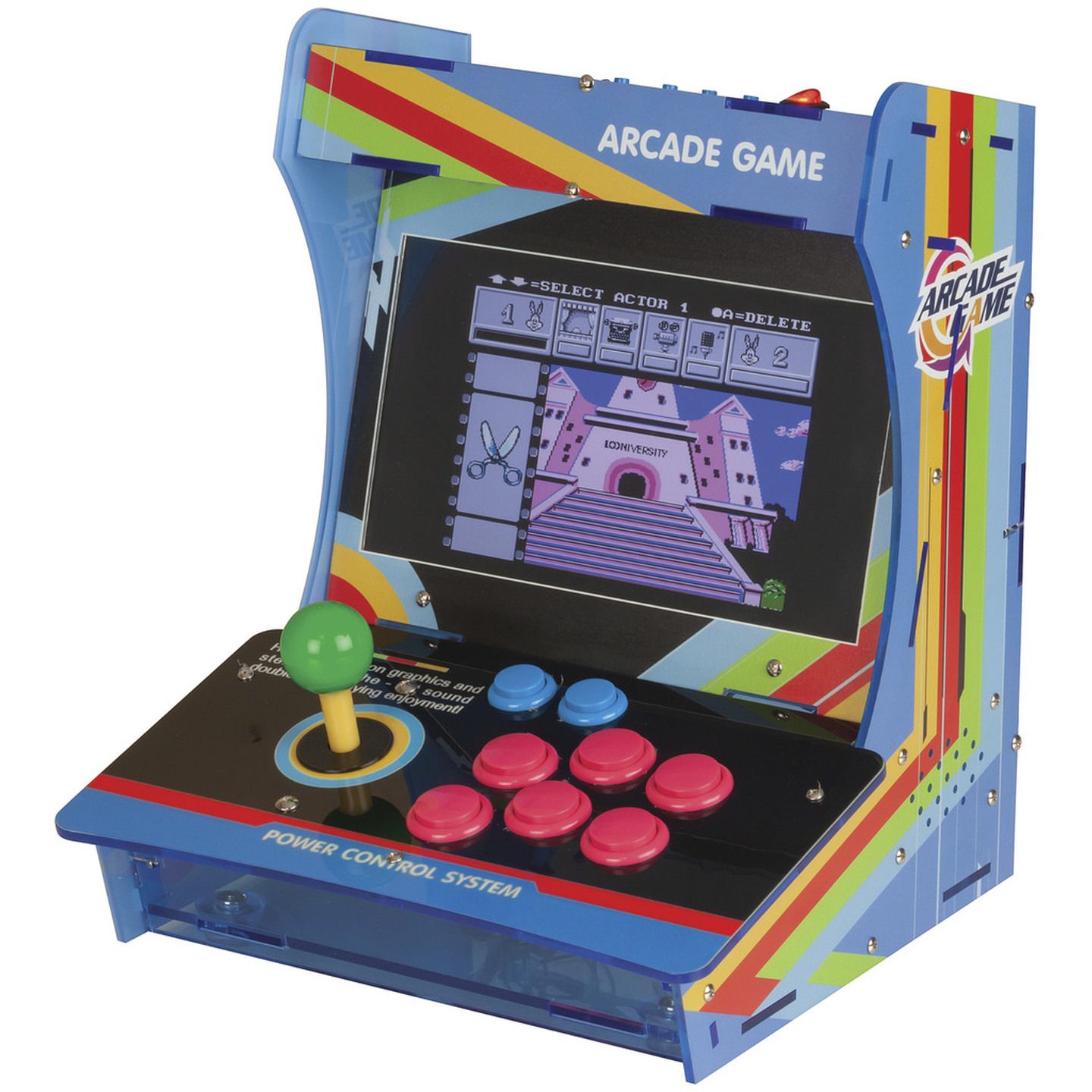


Be the envy of all your mates with the mini table top raspberry Pi retro arcade console, boasting a massive 10 inch LCD screen, there is plenty of gaming real estate to enjoy all your favorites from back in the day, built in speaker will have you remembering your child hood noises with clarity. The console with classic design features a joystick with six buttons, Simply install a Raspberry pi V3 or V4 into the console, insert a Retropie installed micro sd card, copy over some ROMS and you are ready to battle and enjoy some of your old favorites.
Features:
• 40 Pin header for easy connection to Raspberry pi for Joysticks and Buttons.
• 10inch LCD screen, built-in speakers
• 12VDC 3.5A PSU and adaptor for Raspberry Pi
Units needs the following to function:
• Raspberry Pi 3(XC9001) and Pi 4 (XC9100 - 4GB / XC9104 - 8GB)
• Retro pi operating system XC9031
• For Raspberry Pi 4, the extra adapters are required
- Power will need USB Micro B Socket to USB C Plug Adapter PA0937
- HDMI will need HDMI Socket to HDMI Micro-D Adapter PA3649
Easy to Set Up:
- Install Pi 3B (XC9001) or 4B (XC9100, XC9104)
- Install Retro Pi on Raspberry Pi
- Install GPIOnext and reboot
- Copy over ROMs
- Connect to TV and Ready Player 1
10 Inch Screen Raspberry Pi Retro Arcade Game Console
Customer Reviews

3.2
6 reviews
Verified purchases only.
Powered by Bazaarvoice.
What a delightful machine! Easy and fun.
I bought this yesterday as a mini-project for a Raspberry Pi3B I had laying around. After flashing on 'retropie' 4.8, the connecting the github repo listed in the linked manual from Jaycar, the little machine was operational with the GPIO joystick setup an absolute breeze. Just make sure in the 'gpionext config' that you setup joystick 1 with 1 D-pad, and the buttons of Start, Select, A, B, C, X, Y, Z. Pressing ENTER during any new page. Once at the end of the setup, 'gpionext start', then relaunch 'emulationstation'. Once you configure the joystick in Emulationstation, close down using the Start button, down to Quit, then Shutdown. Copy some of your ROMS to the microSD card using your computer. Put it back into the arcade raspberry Pi and enjoy! Absolutely the easiest arcade machine I've setup (coming from 80's arcade boards, then JAMMA and MAME styles). I'm going to remove the 3B shortly and try this with the more horsepower Pi4! Now I wish I bought two of these!
Looks good, but was very difficult to get running
Product works well after spending significant set up time. main issues are. only 5v3.5amp feed internally, so when using the RPI5, there are undervolt messages. RetroPie doesn't have native RPI5 images, so have to use an SDcard and build RetroPie from source. Unclear instructions on enabling GPIO support. When running it does actually work great and looks great. Could be improved by providing a 12v->5v 5amp stepdown instead of a 12v->5v 3.5amp to improve support for rpi5, and shipping with a 240->12v 5amp power supply rather than the 240->12v 3.5amp. on rpi5 don't underestimate extra costs of active cooling fan, sd card, then upgrading PSU components. at NZ$99 its acceptable value, but don't underestimate the cost of rpi5+active cooler+upgrade PSU components+SD card+time spent+NVMe HAT card for RPI5 and NVMe card if you want better reliability than an SD card. Please JCAR, modify this to be more compatible with the RPI5 out the box and make it easier for the eaverage user!
Very frustrated with the Retro game i.e. Arcage ga
Very little infomation on how to set or configure the GPIO to make the Joystick and Buttos work. Nothing simple or readily available to make it work. Using the supplied OS/memory card it boots up fine but nothing worked.
Raspberry pi not included
This product does not include the raspberry pi, that is separate. These are set up to plug directly into a raspberry pi 3, although if you want to use a raspberry pi 4 or 5 instead on these units you'll need to get both a HDMI adapter PA3649 and a Micro-b to USB-c adapter PA0937
Not bad for a first hobbyist arcade
Bought this on clearance, and while it was a little troublesome to get set up, I got there. I ended up using Batocera, and using its native GPIO support in the config file, then pulling the pins out of the connector block and putting them in the right order!
Nice Unit!
I just got this and it is really cool and very much worth the money, especially on clearance. The instructions were not in the box, had to log into the JayCar site to get them... and even then were missing one crucial step. So not the greatest experience there. But really it is a good unit. My only complaints (aside from that bit of annoyance above) are thus: 1)The screen menus come in Chinese (I believe they were in Chinese) and had to guess how to change to English. 2)2 of the Buttons on the controller (I believe the top two right most buttons, B & C ?) aren't working. Not sure if it is a cabling issue in the header connector or if the buttons themselves are not working. This will take some investigating. So will be quite annoying. Aside from that... great value, good screen, plenty loud... I like it a lot. One more slightly annoying thing is the size of the micro hdmi to hdmi adaptor... it is huge so you cannot really use both outputs simultaneously... which isn't a big deal as you can buy smaller adaptors (which I have ordered). Once I get those two buttons working I might add a fan and led lights inside... and possibly a portable power supply... mods for down the road though... buttons first.